Jump to content
View in the app

A better way to browse. Learn more.

Clan GSM

A full-screen app on your home screen with push notifications, badges and more.

To install this app on iOS and iPadOS
  1. Tap the Share icon in Safari
  2. Scroll the menu and tap Add to Home Screen.
  3. Tap Add in the top-right corner.
To install this app on Android
  1. Tap the 3-dot menu (⋮) in the top-right corner of the browser.
  2. Tap Add to Home screen or Install app.
  3. Confirm by tapping Install.

Featured Replies

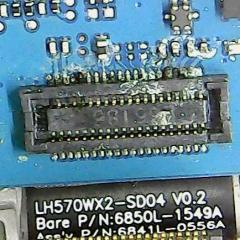
opa Boa Tarde estou com um g5 XT1672 ta funcionando tudo só que o telefone não dava sinal , fiz a consulta na blacklist mais o aparelho não estava bloqueado , abri o aparelho e constatei um pouco de oxidacao na Placa Fiz a Limpeza com álcool isopropilico e antioxid fiz a limpeza não voltou a funciona já tentei baixar o esquema elétrico mais não consegui achar o desse modelo os outro eu achei mais desse não estou mandando á foto da placa para poderem me dar alguma dica o aparelho (Obs: o aparelho não está dando sinal, a sim já troquei a plaquinha de baixo do conector )

20180411_114645.jpg

20180411_114602.jpg

6 horas atrás, Dr.Software disse:

Amigo , coloque chip nele e tenta fazer 1 ligação e verifica se estar pedindo para desativar modo avião !

amigo estou com um nessw situação, pode pra desativa o moto avião alguma dica pra resolver ? 

  • 4 months later...

Join the conversation

You can post now and register later. If you have an account, sign in now to post with your account.
Note: Your post will require moderator approval before it will be visible.

Guest
Reply to this topic...

Recently Browsing 0

  • No registered users viewing this page.

Configure browser push notifications

Chrome (Android)
  1. Tap the lock icon next to the address bar.
  2. Tap Permissions → Notifications.
  3. Adjust your preference.
Chrome (Desktop)
  1. Click the padlock icon in the address bar.
  2. Select Site settings.
  3. Find Notifications and adjust your preference.