Líderes
-
Bruno Santana
ColaboradorPontos4812Postagens -

Cristiano de Moraes
ColaboradorPontos4400Postagens -
-

Paulo de Deus
Super ModeradorPontos2554Postagens




Conteúdo Popular
Exibindo conteúdo com a maior reputação em 12/27/17 em %
-
Whatsapp por favor aguarde
Iuri Donada e 2 outros reagiu a barcelar por uma resposta no tópico
3 pontosSe você tentou instalar o whatsapp no seu windows phone e fica com a mensagem "por favor aguarde" por horas, a solução é simplesmente colocar um numero na agenda e salvar. Ao abrir o whatsapp novamente verá que ele funcionará.3 pontos -
Moto g3 xt1556 desligou apos atualização e fica no bootloader direto, preciso da versão mais atual da rom para recupera-lo
Aldinei Jose e um outro reagiu a Cristiano de Moraes por uma resposta no tópico
2 pontosGiovannyConte, já fez a pergunta uma vez, já te responderam e está aqui novamente fazendo pedido em um novo tópico.Veja: http://www.clangsm.com.br/topic/115665-moto-g3-turbo-xt1556-ajudem/?do=findComment&comment=408730 Leia as regras do fórum: http://www.clangsm.com.br/topic/394-regrastermos-de-uso-do-fórum/ Deve fazer os pedidos em área correta, nesse caso aqui: http://www.clangsm.com.br/topic/27-solicite-sua-flash-motorola-aqui/ Mas respondendo a sua dúvida, aqui temos a firmware mais atual: https://clansoft.net/dl/index.php?a=browse&b=file&id=2899 Tópico encerrado.2 pontos -
Moto G3 (turbo) xt1556 Ajudem !
Cristiano de Moraes e um outro reagiu a Paulo de Deus por uma resposta no tópico
2 pontosBoa tarde, amigo pedimos que de atenção as regras da casa: 10 .d) Escrever o título de maneira clara e objetiva, demonstrando nitidamente o problema que tem dúvidas.Não serão aceitos tópicos com expressões como ''URGENTE, ''AJUDA'' ou sem modelo ou dúvida resumida no título. Exemplo de título ideal : XT1033 não carrega após molhar e também verifique se o local que está postando é o correto o que não é o caso aqui. Tópico encerrado2 pontos -
Procedimento Realizado com sucesso com a Uni-Android Tool
jbcelular e um outro reagiu a Bruno Santana por uma resposta no tópico
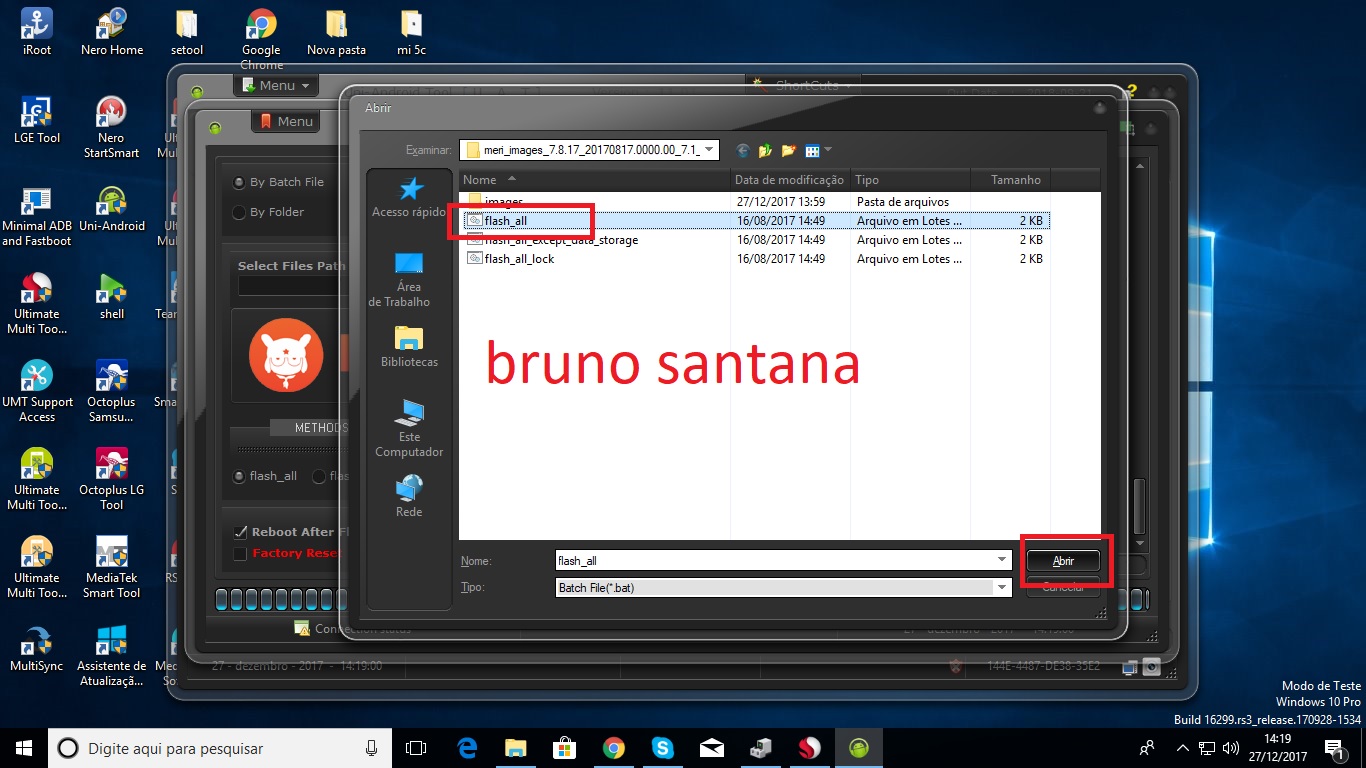
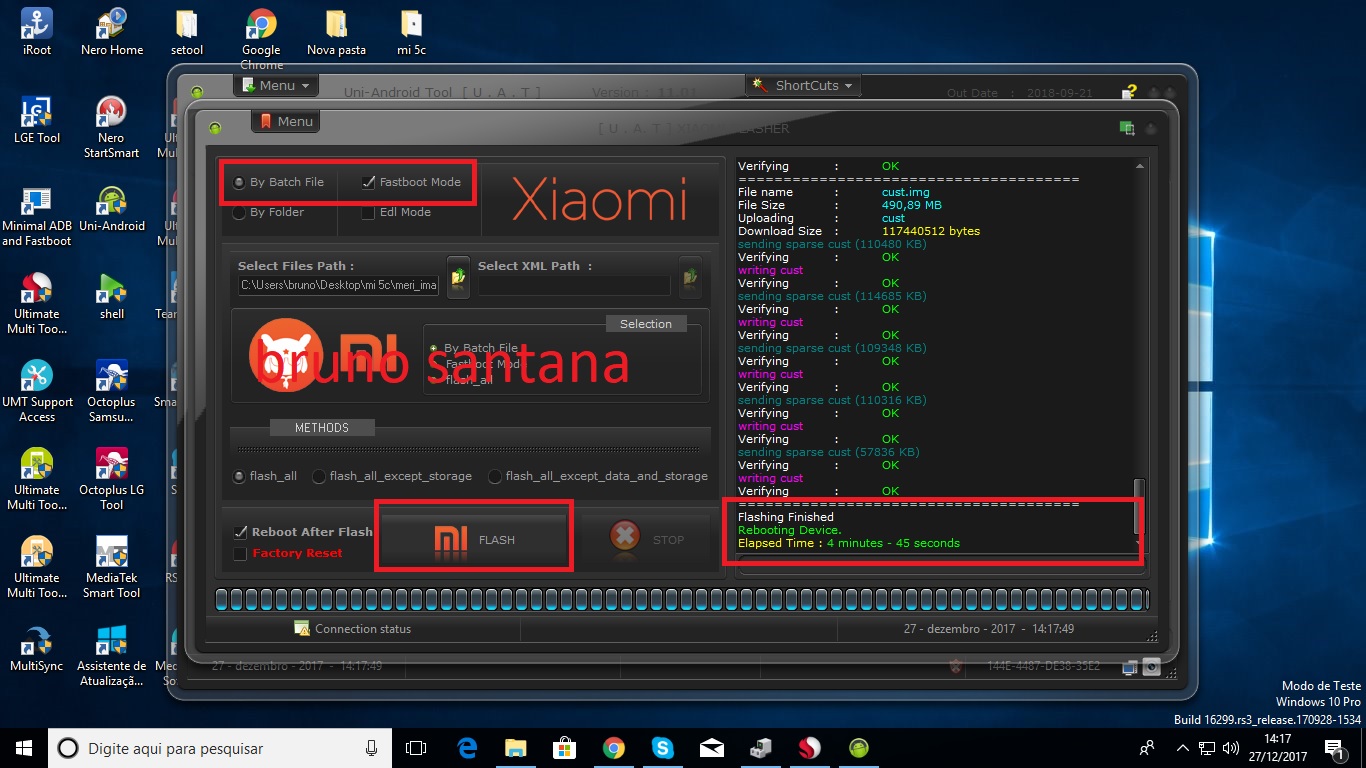
2 pontosflash xiaomi mi 5c 100%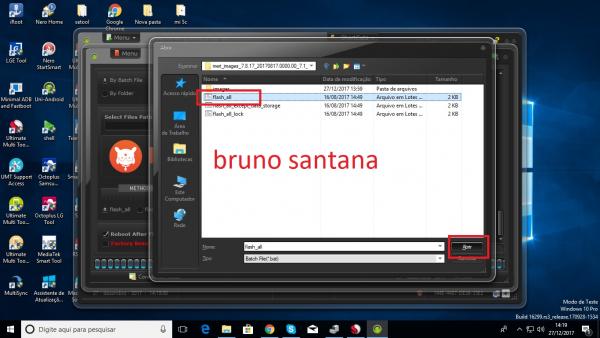
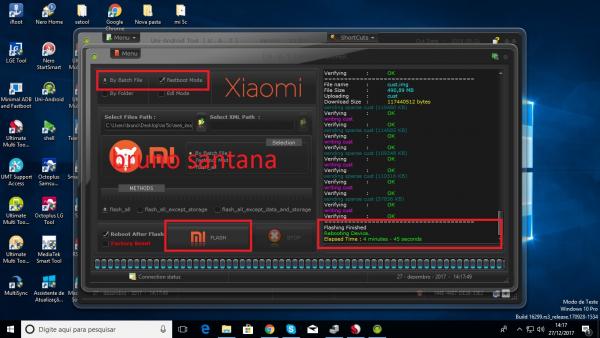 2 pontos
 -
Procedimentos realizados com Sucesso com UMT !!!
123adilson e um outro reagiu a Bruno Santana por uma resposta no tópico
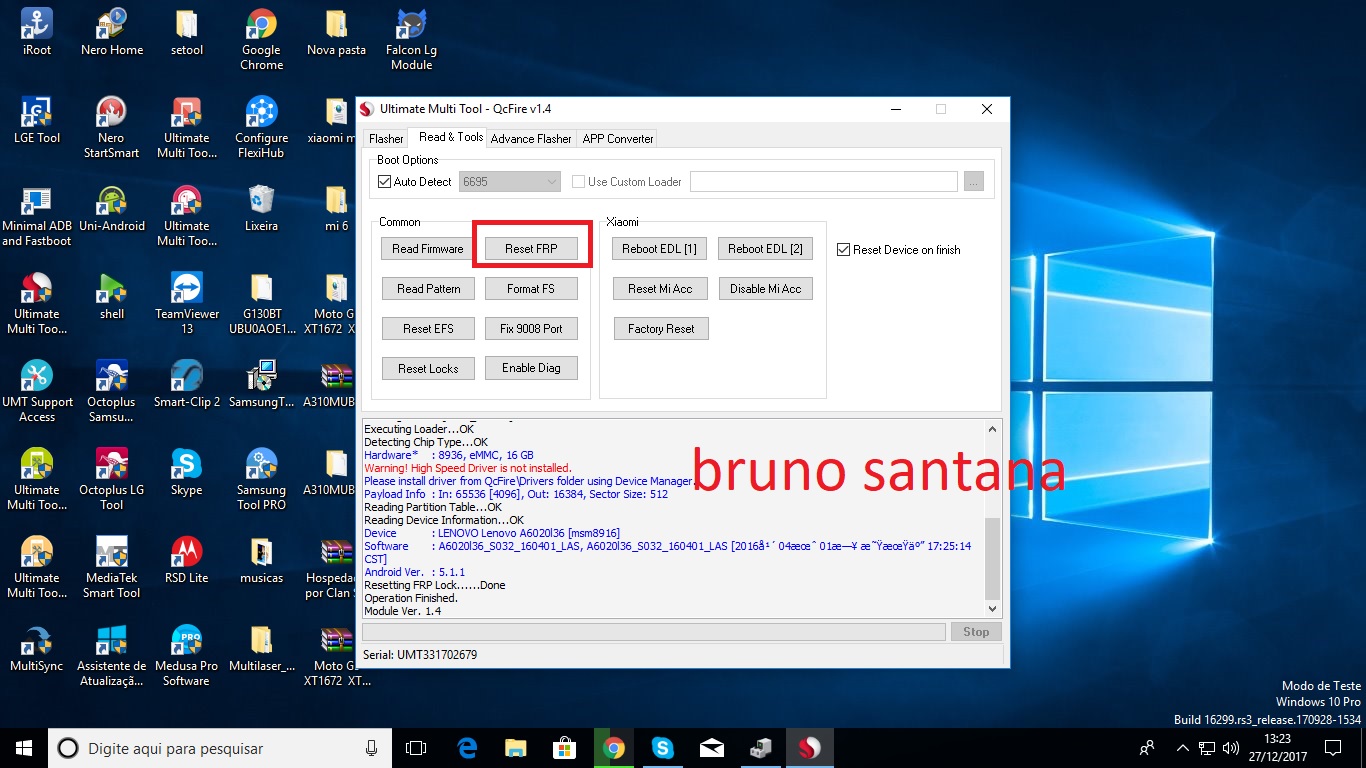
2 pontosreset frp lenovo vibe k5 a6020l36 nesse metodo nao perde wifi Operation : Reset FRP Checking for existing devices...Not Found Turn Off phone, hold Vol UP + Vol DOWN and insert USB cable. Some phones may need Special Boot Cable or TestPoint for EDL mode. Found Port : Qualcomm HS-USB QDLoader 9008 (COM21) Driver Info : Lenovo Inc., leusbser.sys, 2.0.9.6 Connecting to phone...OK Waiting for response...OK Init Handshake Sequence...OK Hardware ID : E1B09000 [8936] 01000100 OPK_DATA : 5F5DBD11259E7F99680B3D60E74EC73BDD5387694EA6D96CBF808A68A7369E82 Initializing Protocol...OK Using Auto Loader Selection [1] Preparing Firehose Loader...Done Sending Loader [8936_004.ufl]...Done Executing Loader...OK Detecting Chip Type...OK Hardware* : 8936, eMMC, 16 GB Warning! High Speed Driver is not installed. Please install driver from QcFire\Drivers folder using Device Manager. Payload Info : In: 65536 [4096], Out: 16384, Sector Size: 512 Reading Partition Table...OK Reading Device Information...OK Device : LENOVO Lenovo A6020l36 [msm8916] Software : A6020l36_S032_160401_LAS, A6020l36_S032_160401_LAS [2016年 04月 01日 星期五 17:25:14 CST] Android Ver. : 5.1.1 Resetting FRP Lock......Done Operation Finished. Module Ver. 1.4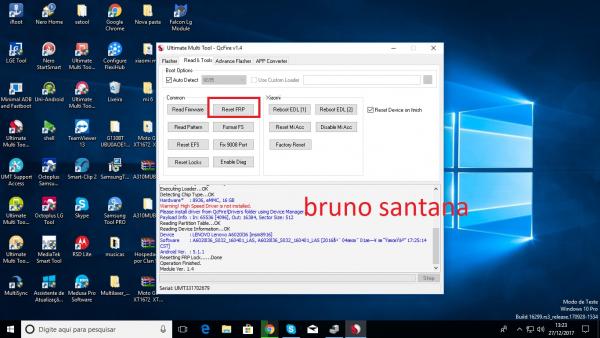 2 pontos
 -
Xiaomi Mi6 como eu desbloqueio Conta Mi Icloud
Vinicius Plácido e um outro reagiu a Bruno Santana por uma resposta no tópico
2 pontosnem a umt nem a uni ta conseguindo retira conta mi6 temos que aguarda novas atualizacao2 pontos -
[Resolvido] Jump Microfone MOTO G4 PLUS XT1640
Leandro Decol reagiu a Guilherme Alcântara por uma resposta no tópico
1 pontoPoxa, eu tava desenhando kkkk1 ponto -
[Resolvido] Jump Microfone MOTO G4 PLUS XT1640
edmar leopoldino reagiu a Ivan kern nunes por uma resposta no tópico
1 pontoBoa tarde amigo,segue o jumper do mesmo,teste e post resultado: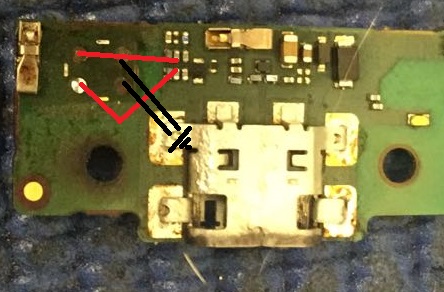 1 ponto
 -
Uni-Android Tool [UAT] Version 11.02 Released
123adilson reagiu a News & Updates por uma resposta no tópico
1 pontoU A T Uni-Android Tool Version 11.02 Released MORE HERE1 ponto -
Solicitação de Flash Alcatel TCL
Reginaldo almeida reagiu a Iuri Donada por uma resposta no tópico
1 pontoAmigo, infelizmente não tenho a UMT e nenhuma outra box pra alcatel :/1 ponto -
Solicitação de Flash Alcatel TCL
Iuri Donada reagiu a Reginaldo almeida por uma resposta no tópico
1 pontoAqui esta a room que você procura amigo , é pra UMT-box ..mas teste com alguma outra que lê o mesmo arquivo , boa sorte . https://www.clansoft.net/dl/index.php?a=search&b=50511 ponto -
Xperia M2 D2306 nao funciona nenhum touch !
Ivan kern nunes reagiu a Victorxdx1 por uma resposta no tópico
1 pontoDesculpe o atraso , eu resolvi dando uma resolda no ci do touch como me falou , resolveu 100%, Obrigado pode fechar o topico!1 ponto -
FRP Samsung A9 Pro 6SM-A910F/DS
wallison jr reagiu a willian por uma resposta no tópico
1 pontoprocure uma assistencia pra fazer o desbloqueio. forum pra tecnicos.( somente tecnicos)1 ponto -
[Resolvido] trilha rompida botão power tablet how max quad
Adalberto Almeida reagiu a Cristiano de Moraes por uma resposta no tópico
1 pontoAs fotos não estão muito boas, mas pelo que aparenta o jump é esse: 1315885630320.bmp1 ponto -
T111m em Loop
Ivan kern nunes reagiu a MBtec por uma resposta no tópico
1 pontoentendi... nao precisa necessariamente encontrar o modelo para conectar.. tendo o pinnout correto ele vai conectar o aparelho da mesma forma. Busquei o Pinnout desse T111, soldei certinho, porem mesmo assim ele nao encontra o aparelho... Sera que estou fazendo algo errado? Tenho a Octoplus pro Jtag, a principio a interface dela (programa) é igual a Medusa Pro... porem como estou aprendendo a usar ela ainda esta meio complicado... estou com 10 aparelhos mais ou menos (d325, d295, d685, j110, h818) e em 1 mes nao consegui salvar nenhum ainda... mas vamos tentando1 ponto -
XT1563 Camera ocupada
PatrickRov reagiu a Will Celulares 144 por uma resposta no tópico
1 pontoJa resolvi diversas vezes Moto G2 e X play com esse problema. A solução mais adequada que achei foi efetuar a troca do conector da câmera, ja nem perco tempo trocando camera , fazendo software ou ressolda, só troco o conector e volta 100%1 ponto -
FRP 7.0 Samsung
Wellington Maciel™ reagiu a Cristiano de Moraes por uma resposta no tópico
1 pontoNeto Penques, nosso amigo já perguntou, qual modelo? Sem saber isso fica impossível te ajudar.1 ponto -
xt1683 não estou conseguindo usar o novo metodo de frp
Iuri Donada reagiu a bobcell por uma resposta no tópico
1 pontoeu estou fazendo com a sigma box sem problemas1 ponto -
LG k4 2017 X230DS nao entra em modo de flash
Leo tec reagiu a Claudio Neto por uma resposta no tópico
1 pontonao é dificil siga passo a passo desse video.1 ponto -
FRP 7.0 Samsung
Cristiano de Moraes reagiu a Wellington Maciel™ por uma resposta no tópico
1 pontoA maioria até via box há dificuldades de retirar o FRP. Precisando passa combination,fazer downgrade e depois FRP. Qual modelo especifico o Sr. esta com dificuldades em retirar conta google?1 ponto -
x230ds frp
juniopms reagiu a Bruno Santana por uma resposta no tópico
1 pontoabra Ultimate Multi Tool - GSM aba miscellaneous depois mtk frp reset boa sorte http://www.clangsm.com.br/topic/110967-procedimentos-realizados-com-sucesso-com-umt/?do=findComment&comment=3983811 ponto -
Parabéns Sr. Cristiano Moraes .....
Cristiano de Moraes reagiu a Anderson Alves por uma resposta no tópico
1 pontoaewwww atrasado. mais meus Parabéns Cristiano que Deus possa iluminar vc e sua família muita saúde guerreiro TMJ manuuuu !!1 ponto -
Conta google J7 neo SM-J701MT
Reginaldo almeida reagiu a EmersonJr por uma resposta no tópico
1 pontoMétodo do Ary de passar a combination depois de ativar a depuração passar flash deu tudo ok aqui 100% ajudou muito !!!1 ponto -
Procedimentos realizados com Sucesso com UMT !!!
Reginaldo almeida reagiu a nengo por uma resposta no tópico
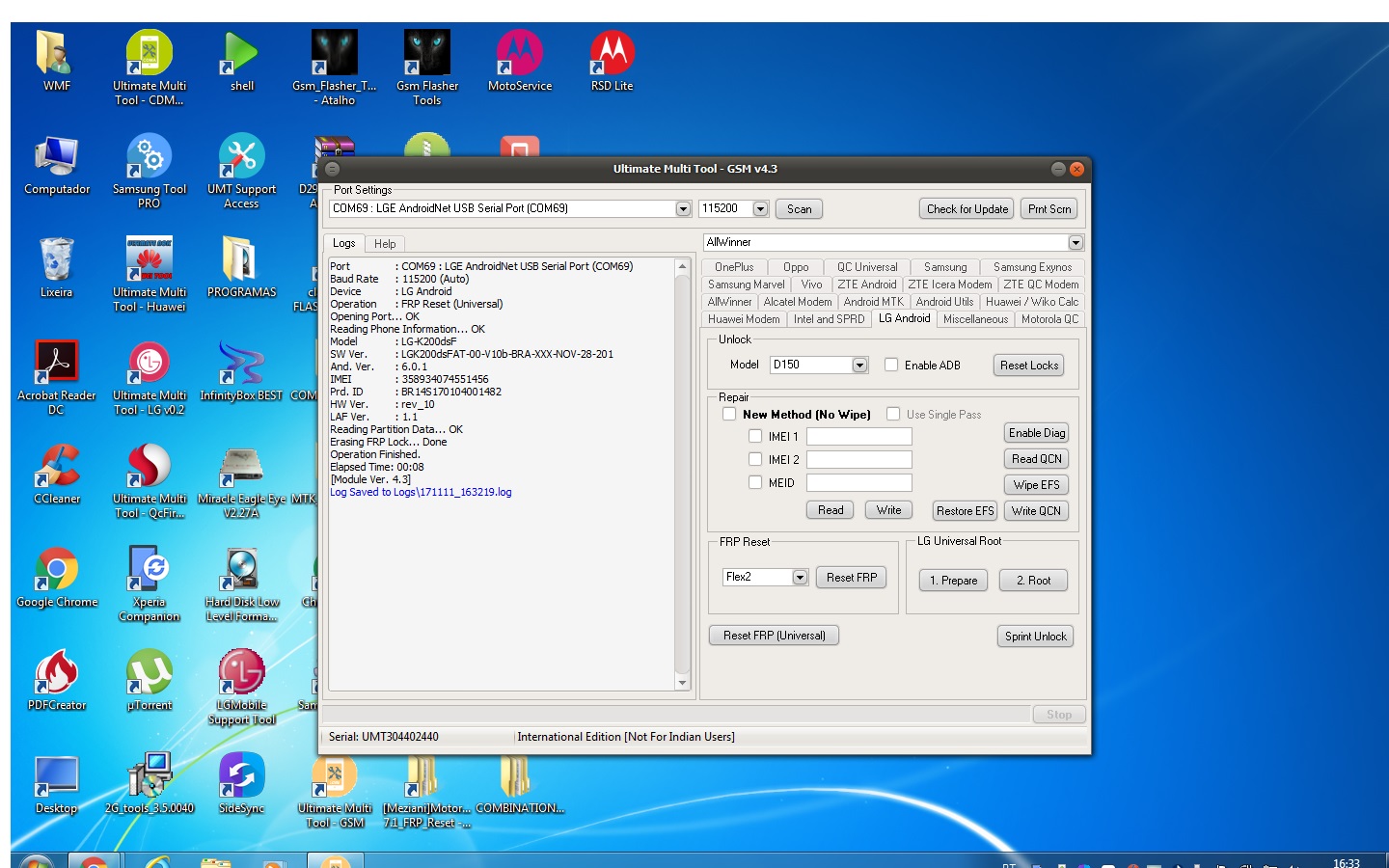
1 pontofrp lg k200 so colocar em modo dowload e clicar em frp universal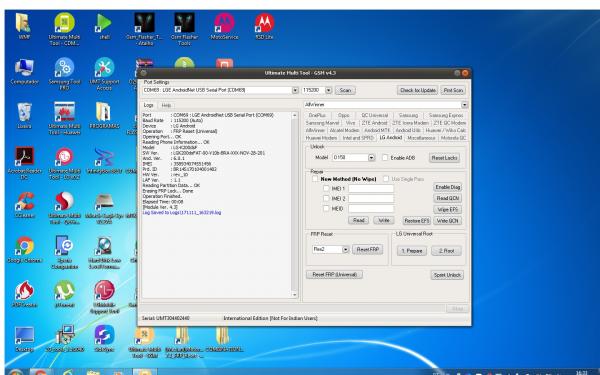 1 ponto
 -
Guia de Reparos Samsung
Thiago Miguel reagiu a Guilherme Alcântara por uma resposta no tópico
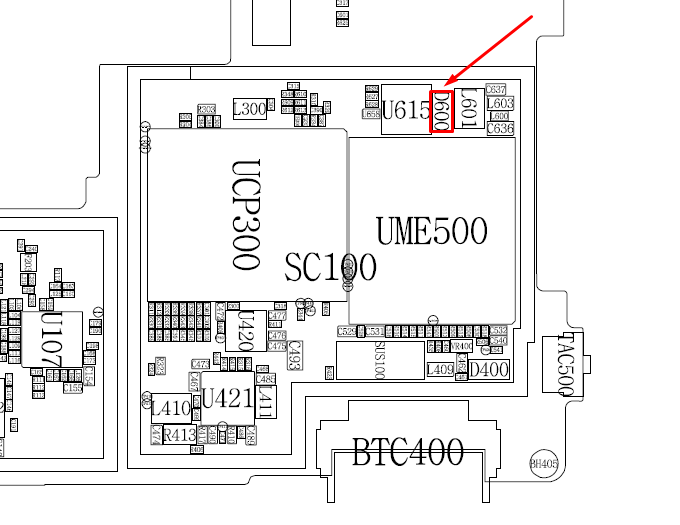
1 pontoSamsung G530H/DS não regula o brilho da tela. - Trocar o diodo indicado na imagem.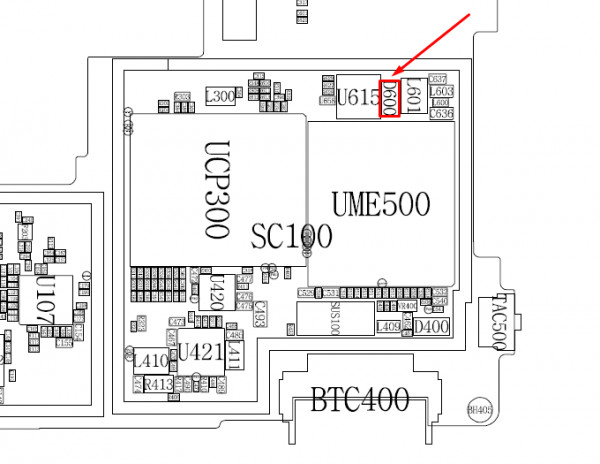 1 ponto
 -
Procedimentos realizados com Sucesso com UMT !!!
Reginaldo almeida reagiu a Breno Rodrigues por uma resposta no tópico
1 pontomoto g5 frp feito segurança nova. Port : Fastboot Inteface Baud Rate : Not Applicable Device : Motorola Operation : New FRP Reset Searching for Device in FastBoot Mode... OK Reading Phone Information... Model : XT1672 Boot Ver. : moto-msm8937-B8.23 Baseband : M8937_8000.122.02.45R CEDRIC_BRAZILDSDS_CUST Software : Blur_Version.25.226.10.cedric.retail.en.US IMEI : 356487088561518 CPU : MSM8937 RAM : 2GB SAMSUNG LP3 DIE=8Gb M5=01 M6=05 M7=00 M8=1F EMMC : 32GB SAMSUNG QX13MB RV=08 PV=07 FV=0000000000000007 Setting Factory Mode... OK Searching Network Interface... Found Connecting to device... OK Model : Moto G (5) Bootloader : 0xB823 Baseband : M8937_8000.122.02.45R CEDRIC_BRAZILDSDS_CUST Build : Blur_Version.25.226.10.cedric.retail.en.US Android : 7.0 Searching Network Interface... Found Connecting to device... OK Model : Moto G (5) Bootloader : 0xB823 Baseband : M8937_8000.122.02.45R CEDRIC_BRAZILDSDS_CUST Build : Blur_Version.25.226.10.cedric.retail.en.US Android : 7.0 Resetting FRP... OK Searching for Device in FastBoot Mode... OK Removing Factory Mode... OK Operation Finished. Elapsed Time: 03:06 [Module Ver. 4.3] Log Saved to Logs\171103_091129.log1 ponto -
J700 mostra que tá carregando mas não carrega
willame9012ac97will reagiu a zezinho tudo celular por uma resposta no tópico
1 pontotava com o mesmo problema, resolvi trocando.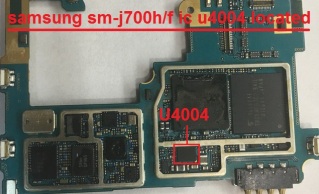 1 ponto
 -
T111m em Loop
PatrickRov reagiu a Ivan kern nunes por uma resposta no tópico
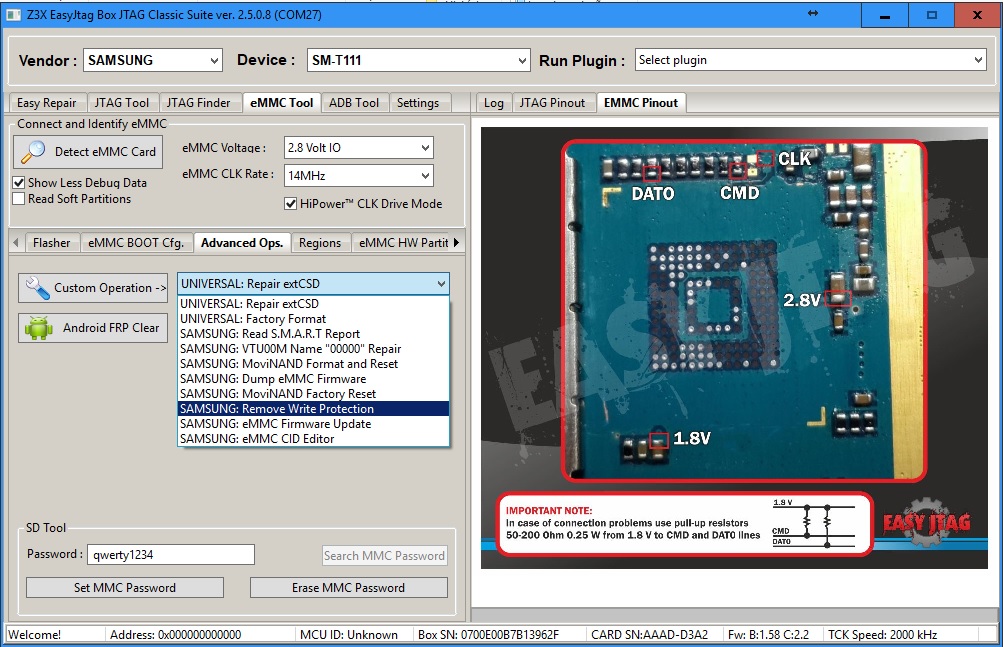
1 pontoboa tarde amigos,se possuem a z3x easy ou a medusa pro só aplicar o ( remove write protection ) e aplicar a firmware diretamente via isp,ou via odin após o procedimento .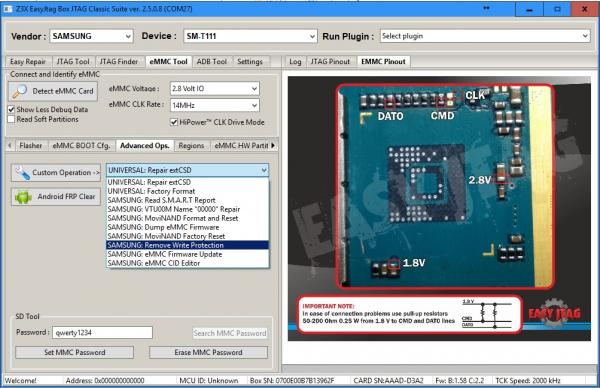 1 ponto
 -
Erro Flash E465f
TonesMorais reagiu a Aldinei Jose por uma resposta no tópico
1 pontoEsse erro nao adianta j tag mesmo porque a cpu e mtk nao tem procedimento j tag para esse processador e esse erro e defeito de hardware ou seja fisico ate o momento somente trocado a placa1 ponto -
Nao carrega GT - I8552B
Andre Bordonalli reagiu a Cristiano de Moraes por uma resposta no tópico
1 pontoTente fazer o jump para testar: http://www.clangsm.com.br/topic/110648-guia-de-reparos-samsung/?page=45#comment-3477501 ponto -
J700 mostra que tá carregando mas não carrega
ramon menezes silva reagiu a Leonardo Bier por uma resposta no tópico
1 pontofaça oq o amigo disse que dará certo, ja fiz esse procedimento obs: dificilmente ressolda fará ele voltar, apenas troque o ci que dará certo.1 ponto -
XT1563 wifi não funciona
renan zorzo reagiu a weslley de lima sales por uma resposta no tópico
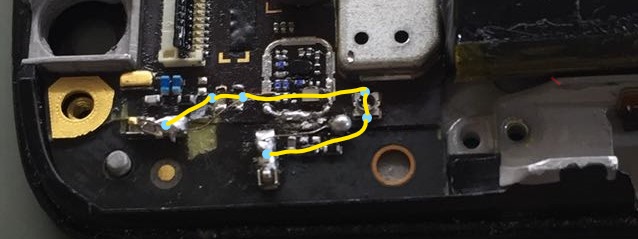
1 pontopessoal fiz o q o amigo cleyton15 falou e ficou ótimo e para melhorar estendi o jump. vou colocar uma foto ae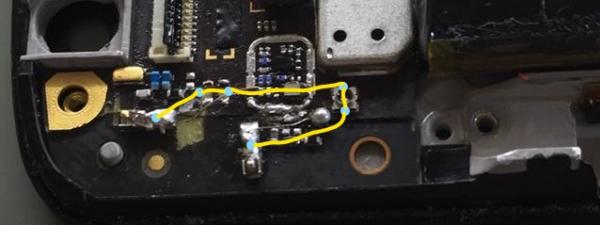 1 ponto
 -
5016J pop3 da alcatel onetouch não exclui conta do gmail
Reginaldo almeida reagiu a Anderson Vieira por uma resposta no tópico
1 pontoTópico antigo e com varias soluções já postadas por isso estarei fechando o mesmo.. Tópico Fechado...1 ponto -
Moto G 1º gen Tela Azul
Paulo de Deus reagiu a Cleyton Moreira por uma resposta no tópico
1 pontoamigo ja peguei um assim. quebrei muito a cabeça para resolver fiz de tudo e não resolvia tava quase desistindo e o defeito do meu aparelho era so a blindagem, essa blindagem da para retirar e colocar manualmente, quando dava uma batida no celular ficava tela azul, essa blindagem entrava em contato com um capacitor fazendo assim a tela azul removi a blindagem e funcionava perfeitamente,ai coloquei bem direitinho a blindagem e deu certo,lembrando essa blindagem é a unica que sai com facilidade e voçe pode colocar novamente com a mao!1 ponto -
1 pontoamigo ja resolvido porém uma dica: tela vermelha = defeito no sensor de proximidade tela azul = problema no botao home ou no parafuso da chapa que prende o touch e lcd1 ponto







.thumb.jpg.7d5402c1fa18c50ca6bae970e26b9174.jpg)