

William Ferreira
-
Registro em
-
Última visita
Posts postados por William Ferreira
-
-
-
Angel verifique a versão do flex novo que voce colocouo ideal é trocar apenas o conector do flex original,s9 e s9+ tem variantes
- Arthur Gama reagiu a isso
-
 1
1
-
Postado ·
Editado por William Ferreira
Obrigado fagner,mas esse que mandou é a20s não o a21s a217m que preciso
-
-
Operation : Reset FRP
Checking for existing devices...Not Found
Turn Off phone, hold Vol UP + Vol DOWN and insert USB cable.
Some phones may need Special Boot Cable or TestPoint for EDL mode.
Found Port : Qualcomm HS-USB QDLoader 9008 (COM10)
Driver Info : Network Connect, qcusbser.sys, 3.0.0.0
Connecting to phone...OK
Waiting for response...OK
Init Handshake Sequence...OK
Hardware ID : E1F00400 [8937] 39A21620
OPK_DATA : FDB379775FEB07C551EFBC01F78CD6ABAC99A2829E6F63768E4491B32485B6E5
Initializing Protocol...OK
Using Auto Loader Selection [1]
Preparing Loader...Done
Sending Loader [8937_015]...Done
Executing Loader...OK
Detecting Chip Type...OK
Hardware : 8937, eMMC, 32 GB
LU Count : 1 [0x03A3E000]
WARNING! High Speed Driver is not installed.
Please install driver from QcFire\Drivers folder using Device Manager.
Payload Info : In: 65536 [4096], Out: 1048576, Sector Size: 512
Reading Partition Table...OK
Reading Device Information...OK
Device : asus ASUS_X00LDA [msm8937]
Software : NMF26F.WW_Phone-14.0400.1807.205-20180807, 14.0400.1807.205-20180807 [Tue Aug 7 13:44:42 CST 2018]
Android Ver. : 7.1.1
Patch Level : 2018-07-01
Resetting FRP Lock......Done
Operation Finished.
QcFire Ver. 4.1 -
Reset FRP Redmi Note 5
Operation : Reset FRP
Checking for existing devices...Not Found
Turn Off phone, hold Vol UP + Vol DOWN and insert USB cable.
Some phones may need Special Boot Cable or TestPoint for EDL mode.
Found Port : Qualcomm HS-USB QDLoader 9008 (COM19)
Driver Info : Qualcomm Incorporated, qcusbser.sys, 2.0.8.7
Connecting to phone...OK
Waiting for response...OK
Init Handshake Sequence...OK
Hardware ID : E1C00C00 [8996] 00000000
OPK_DATA : F7337FE47B192EF4D1BA34CB4E879F0C6B771D06D2DE87BF21F65BA3303834E1
Initializing Protocol...OK
Using Auto Loader Selection [1]
Preparing Loader...Done
Sending Loader [8996_016]...Done
Executing Loader...OK
Detecting Chip Type...OK
Hardware : MSM8996, eMMC, 64 GB
LU Count : 1 [0x0747C000]
WARNING! High Speed Driver is not installed.
Please install driver from QcFire\Drivers folder using Device Manager.
Payload Info : In: 65536 [4096], Out: 131072, Sector Size: 512
Reading Partition Table...OK
Reading Device Information...OK
Device : Xiaomi Redmi Note 5
Software : OPM1.171019.011, V10.0.2.0.OEIMIFH [Mon Oct 8 19:41:43 WIB 2018]
Android Ver. : 8.1.0
Patch Level : 2018-09-01
Resetting FRP Lock.......Done
Operation Finished.
QcFire Ver. 4.6 -
Restore EFS Redmi Note 7 Baseband unknow
Operation : Restore EFS
Checking for existing devices...Not Found
Turn Off phone, hold Vol UP + Vol DOWN and insert USB cable.
Some phones may need Special Boot Cable or TestPoint for EDL mode.
Found Port : Qualcomm HS-USB QDLoader 9008 (COM20)
Driver Info : Qualcomm Incorporated, qcusbser.sys, 2.1.0.5
Connecting to phone...OK
Waiting for response...OK
Init Handshake Sequence...OK
Hardware ID : E1C00800 [8996] 00000000
OPK_DATA : F7337FE47B192EF4D1BA34CB4E879F0C6B771D06D2DE87BF21F65BA3303834E1
Initializing Protocol...OK
Using Auto Loader Selection [1]
Preparing Loader...Done
Sending Loader [8996_022]...Done
Executing Loader...OK
Detecting Chip Type...OK
Hardware : MSM8996, eMMC, 64 GB
LU Count : 1 [0x0747C000]
WARNING! High Speed Driver is not installed.
Please install driver from QcFire\Drivers folder using Device Manager.
Payload Info : In: 65536 [4096], Out: 131072, Sector Size: 512
Reading Partition Table...OK
Reading Device Information...OK
Device : Xiaomi Redmi Note 7 [lavender]
Software : PKQ1.180904.001, V10.3.6.0.PFGMIXM [Tue Jun 18 01:04:48 WIB 2019]
Android Ver. : 9
Patch Level : 2019-05-05
Backup File : EFS_Xiaomi_Redmi Note 7_PKQ1.180904.001_2019-02-05_190517_144130.ueb
Restoring EFS.......Done
Operation Finished.
QcFire Ver. 4.6- Jesiel Pfeifer reagiu a isso
-
1
-
1 hora atrás, Jesiel Pfeifer disse:
@moises santos
quando fica em loop tenta fazer o seguinte, faça o wipe nas partições de acordo com o post acima e faça a instalação dos apps no TWRP na seguinte ordem:
custom rom > dm > magisk
ou
magisk > dm > custom > magisk
Testado e aprovado seguindo a dica do amigo Jesiel
Coloquei na sequencia rom-dm-magisk e ligou perfeito!
- Jesiel Pfeifer reagiu a isso
-
1
-
Port : ADB Interface
Baud Rate : Not Applicable
Device : Motorola
Operation : Reset FRP
Searching for Device... Found
Model : moto g(6) plus
Version : 9
Hardware : qcom
Baseband : M660_27.46.01.92R EVERT_BRAZILDSDS_CUST
SIM Card
CPU : arm64-v8a
Type : Unknown
MEID(1) : Null/Empty
Root : Not Rooted
Resetting FRP Lock... Done
Operation Finished.
Elapsed Time: 00:07
[Module Ver. 5.3]
Sucesso na UMT
- Bruno Santana reagiu a isso
-
1
-
Peguei um q7+ que após instalar o software de forma mal sucedida ficou travado nesta tela,resolvi reinstalando o software do mesmo e esperei até que terminar pela octopus mesmo
-
Reset Mi Account Mi 8 Lite
Operation : Reset Mi Account
Checking for existing devices...Not Found
Turn Off phone, hold Vol UP + Vol DOWN and insert USB cable.
Some phones may need Special Boot Cable or TestPoint for EDL mode.
Found Port : Qualcomm HS-USB QDLoader 9008 (COM64)
Driver Info : Network Connect, qcusbser.sys, 3.0.0.0
Connecting to phone...OK
Waiting for response...OK
Init Handshake Sequence...OK
Hardware ID : E1C00800 [8996] 00000000
OPK_DATA : F7337FE47B192EF4D1BA34CB4E879F0C6B771D06D2DE87BF21F65BA3303834E1
Initializing Protocol...OK
Using Auto Loader Selection [1]
Preparing Loader...Done
Sending Loader [8996_022]...Done
Executing Loader...OK
Detecting Chip Type...OK
Hardware : MSM8996, eMMC, 64 GB
LU Count : 1 [0x0747C000]
WARNING! High Speed Driver is not installed.
Please install driver from QcFire\Drivers folder using Device Manager.
Payload Info : In: 65536 [4096], Out: 131072, Sector Size: 512
Reading Partition Table...OK
Reading Device Information...OK
Device : Xiaomi MI 8 Lite
Software : OPM1.171019.019, V10.2.2.0.ODTMIXM [Tue Jan 15 10:53:40 WIB 2019]
Android Ver. : 8.1.0
Patch Level : 2018-12-01
Resetting Mi Account Data...Done
Preparing Data...Done
Formatting Userdata...Done
When phone is completely ON, connect to Internet and add Mi Account.
-------------- INFORMATION --------------
New Firmware may cause hang on logo.
In such case, you need to flash phone to recover.
Or downgrade firmware and try Reset Mi Account again.
Operation Finished.
QcFire Ver. 3.9 -
Troca a camera amigo,pode ter danificado na hora da troca,já fez todos procedimentos cabiveis,so resta testar com uma camera nova,boa sorte!
- Leandro Decol reagiu a isso
-
 1
1
-
1 hora atrás, Giovanni cell disse:
Pessoal hoje chegou na minha assistência j3 pra troca a tela troquei testei tudo ok sensor só q quando coloco pra roda no you tube a tela apaga mais fica rodado a vídeo normal com som na nos vídeo da galeria a tela não apaga alguém já viu isso mim ajude já formatei e não resolveu
Todos que peguei era problema com a frontal amigo,teste com uma original nacional e veja se o problema persiste.
- Vinicius Plácido reagiu a isso
-
1
-
-
Frp Motorola One 9.0 Android Pie
Port : Fastboot Inteface
Baud Rate : Not Applicable
Device : Motorola
Operation : New FRP Reset
Searching for Device in FastBoot Mode... OK
Reading Phone Information...
Model : XT1941-3
Boot Ver. : MBM-2.1-deen_retail-65423a4-181106
Baseband : M8953_15.11.02.17R DEEN_LATAMDSDS_CUST
Software : Blur_Version.29.21.11.deen.retail.en.US
IMEI : 359521091103152
CPU : MSM8953
RAM : 4GB SAMSUNG LP3 DIE=8Gb M5=01 M6=06 M7=00 M8=5F
EMMC : 64GB SAMSUNG RH64AB RV=08 PV=05 FV=0000000000000005
Setting Factory Mode... OK
Searching Network Interface... Found
Connecting to device... OK
Model : motorola one
Bootloader : 0xC40A
Baseband : M8953_15.11.02.17R DEEN_LATAMDSDS_CUST
Build : Blur_Version.29.21.11.deen.retail.en.US
Android : 9
Searching Network Interface... Found
Connecting to device... OK
Model : motorola one
Bootloader : 0xC40A
Baseband : M8953_15.11.02.17R DEEN_LATAMDSDS_CUST
Build : Blur_Version.29.21.11.deen.retail.en.US
Android : 9
Resetting FRP... OK
Searching for Device in FastBoot Mode... OK
Removing Factory Mode... OK
Operation Finished.
Elapsed Time: 02:55
[Module Ver. 5.2]
Log Saved to Logs\181221_184029.log- Bruno Santana e rafa81 reagiu a isso
-
2
-
- tarsoayala, Paulo de Deus e Wellington Maciel™ reagiu a isso
-
3
-
Solucionei um sabado aqui na loja com defeito no touch na 8.1.0
Bootloader precisa estar desbloqueado!
Pesquisem ''backup_7.1.1-XT1710-Fastboot_stockrom.net''
Dentro do arquivo ja tem um instalador da rom e com o root bem explicados!
Foi 100% aqui comigo,imei normal todas as funções ok!
-
Agora, Mauricio De Lima Cardoso disse:
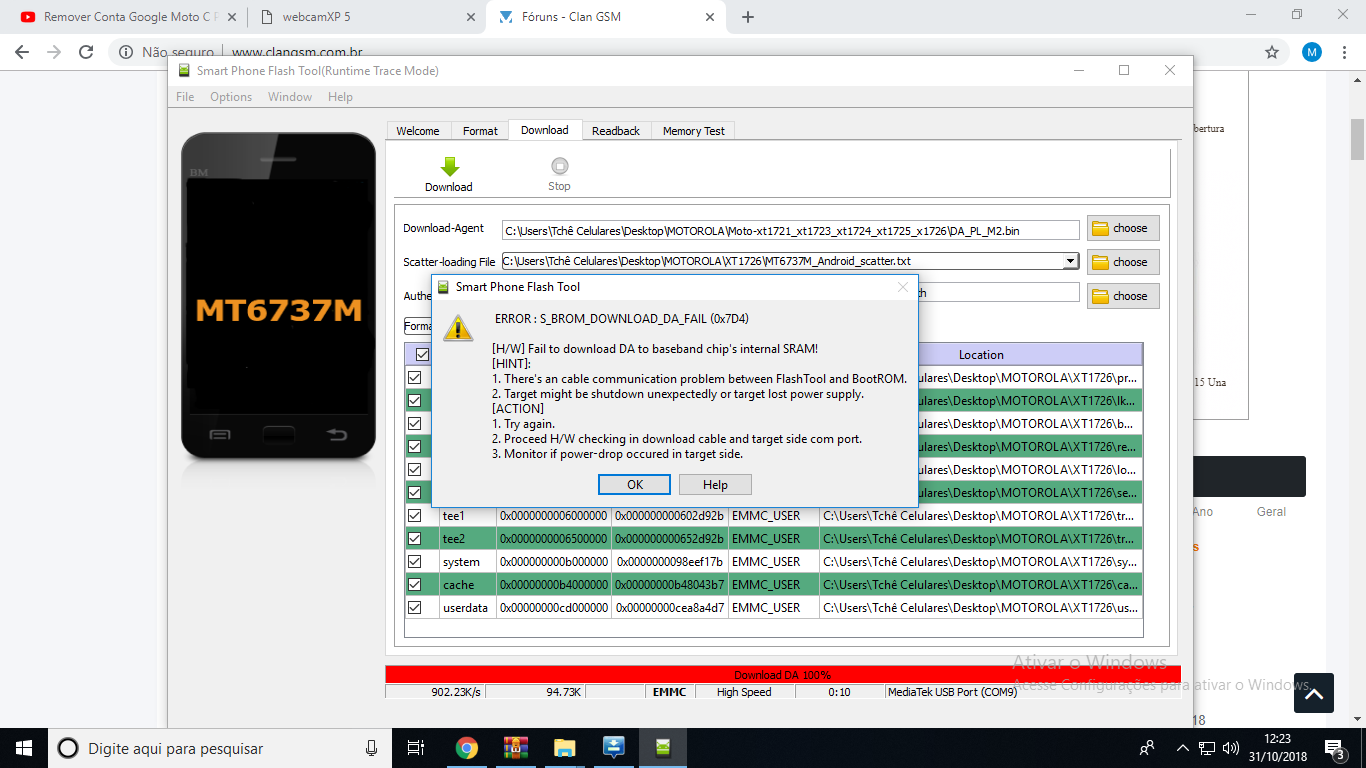
Peguei um Moto C aqui na bancada e ele não dava sinal nenhum, conectei via USB e verifiquei que ele reconhece a porta e instala os driver MTK. Baixei diversas versoes do Flashtool , Authentication file tambem, e o erro continua.
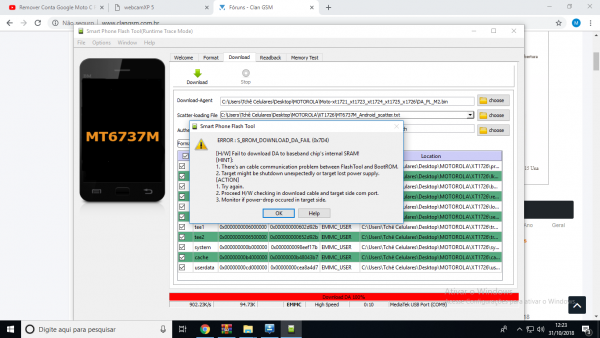
Boa tarde amigo,tive o mesmo problema com este aparelho aqui,tente passar a rom desmarcando o ''preloader'' e com o arquivo auth em sua respectiva seção,aqui foi 100%,boa sorte! https://www.clansoft.net/dl/index.php?a=downloads&b=file&id=4043
-
Aparentemente é problema na tela mesmo amigo,por via das dúvidas coloca ele modo donwload e veja se continua o defeito,boa sorte!
Citararente
CitarCitar -
-
Bom dia amigo @Danilo T Silva
Siga o procedimento a risca que terá exito
https://www.clansoft.net/dl/index.php?a=downloads&b=file&id=3897
Serve para os últimos patchs lançados pela samsung entre a510x.. J6... S9...
- pedrosousa.226 e Reginaldo almeida reagiu a isso
-
2
-
Reset Conta Mi Redmi 5 plus 8.1.0
Operation : Reset Mi Account
Checking for existing devices...Not Found
Turn Off phone, hold Vol UP + Vol DOWN and insert USB cable.
Some phones may need Special Boot Cable or TestPoint for EDL mode.
Found Port : Qualcomm HS-USB QDLoader 9008 (COM97)
Driver Info : Qualcomm Incorporated, qcusbser.sys, 2.1.2.2
Connecting to phone...OK
Waiting for response...OK
Init Handshake Sequence...OK
Hardware ID : E1600400 [8953] 00000000
OPK_DATA : 079E496E26A477B120DFCD85DF7E4AD067164D8292DDD379930D5891E3D8240B
Initializing Protocol...OK
Using Auto Loader Selection [1]
Preparing Loader...Done
Sending Loader [8953]...Done
Executing Loader...OK
Detecting Chip Type...OK
Hardware : 8953, eMMC, 64 GB
LU Count : 1 [0x0747C000]
WARNING! High Speed Driver is not installed.
Please install driver from QcFire\Drivers folder using Device Manager.
Payload Info : In: 65536 [4096], Out: 1048576, Sector Size: 512
Reading Partition Table...OK
Reading Device Information...OK
Device : Xiaomi Redmi 5 Plus [msm8953]
Software : ZQL1711-vince-build-20180817135416, V9.6.5.0.OEGMIFD [Fri Aug 17 13:54:03 WIB 2018]
Android Ver. : 8.1.0
Patch Level : 2018-08-05
Resetting Mi Account Data...Done
Preparing Data...Done
Formatting Userdata...Done
When phone is completely ON, connect to Internet and add Mi Account.
-------------- INFORMATION --------------
New Firmware may cause hang on logo.
In such case, you need to flash phone to recover.
Or downgrade firmware and try Reset Mi Account again.
Operation Finished.
QcFire Ver. 2.8- Reginaldo almeida reagiu a isso
-
1
-
Use o metodo do G9650 que esta disponivel no clan,já fiz esse J6 aqui binario 2 e deu certo
https://www.clansoft.net/dl/index.php?a=downloads&b=file&id=3897
-
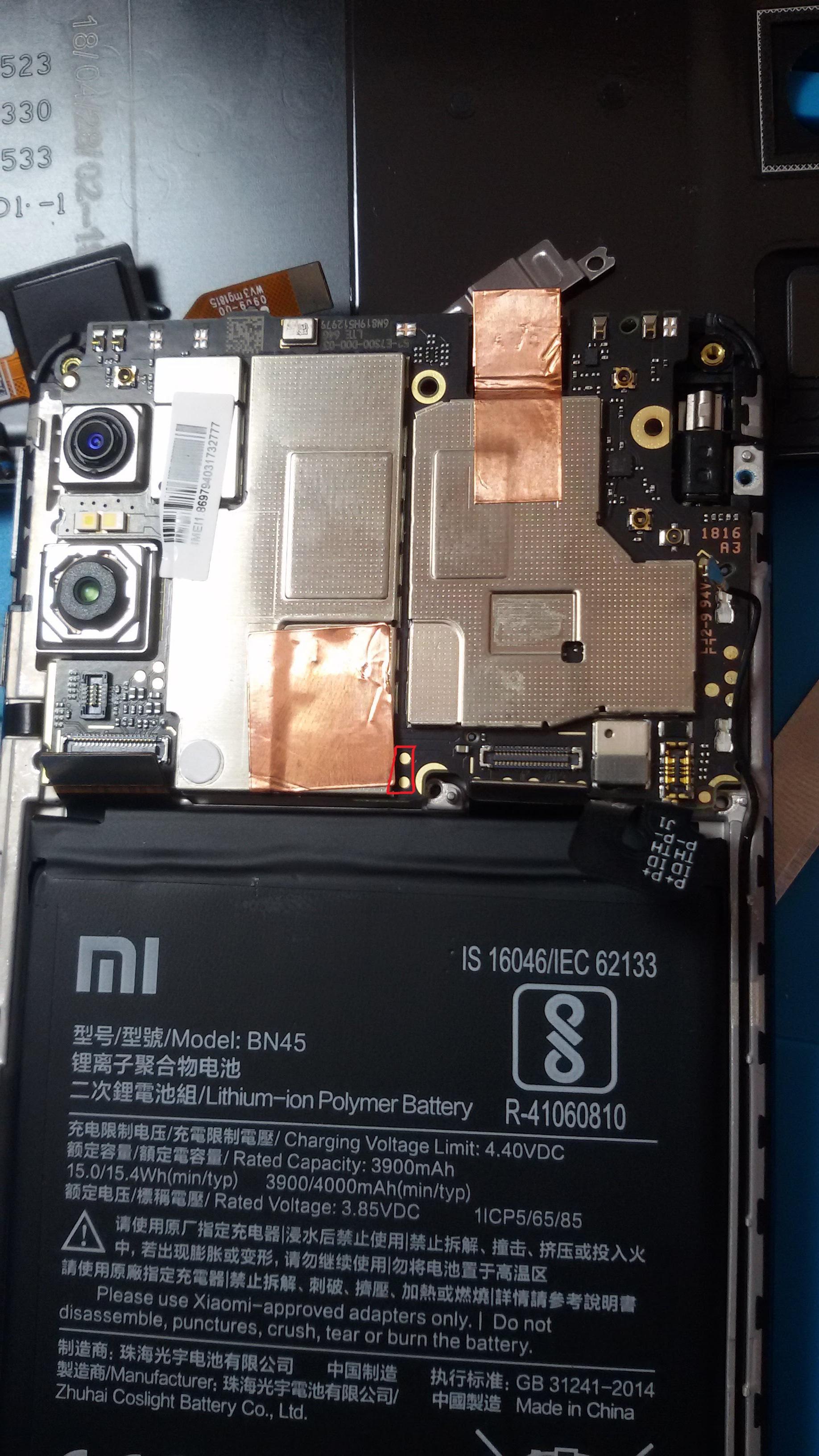
Esquematico SM-R820, alguém tem?
em REPAROS NO HARDWARE
Postado
Esquematico SM-R820, alguém tem? Só achei no easy firmware